Dashboard To-Do List: two things you asked for
1. Your club calls and practices are now on the To-Do List
If you are in a club you can now see this week's call and practice right on your dashboard. They sit under your list in their own group called "This week in your clubs".
To switch it on: open To-Do & Plans at the bottom of your dashboard and turn on Club calls and practices. You will need your community account linked in Community Connect for the switch to show up.
2. You can now look back at the last 7 days
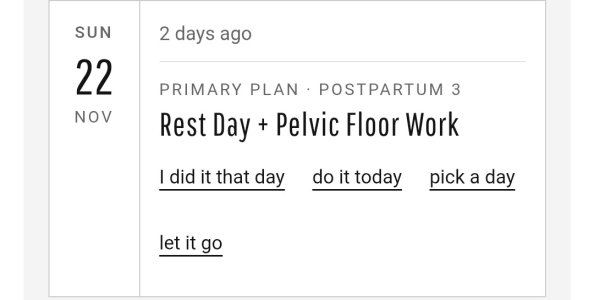
Life happens and a task gets left behind. When something on your list was not ticked in the last 7 days a quiet still open link appears under your list next to "coming up". It opens everything that was left, day by day, and each task gets three choices:
Plan days also get "I did it that day" for the times you did the work and forgot the tick.
A few honest notes. Days you skipped on purpose and rest days never show up there. Nothing is called missed or late because a day that was left is simply left. Repeating tasks start looking back from today, so yesterday's forgotten walk gets away with it this once.
If something looks odd or you can think of a way to make the list better we would love to hear it.
If you are in a club you can now see this week's call and practice right on your dashboard. They sit under your list in their own group called "This week in your clubs".
- Each one links to its club page. That is still where Done and Practiced get tapped.
- Once it is done in the club it ticks itself on your list.
- They stay out of your daily count. A call is open all week and we did not want it standing between you and "All done for today".
To switch it on: open To-Do & Plans at the bottom of your dashboard and turn on Club calls and practices. You will need your community account linked in Community Connect for the switch to show up.
2. You can now look back at the last 7 days
Life happens and a task gets left behind. When something on your list was not ticked in the last 7 days a quiet still open link appears under your list next to "coming up". It opens everything that was left, day by day, and each task gets three choices:
- do it today puts it on today's list
- pick a day gives it a new date
- let it go takes it off for good and nobody will ever mention it again
Plan days also get "I did it that day" for the times you did the work and forgot the tick.
A few honest notes. Days you skipped on purpose and rest days never show up there. Nothing is called missed or late because a day that was left is simply left. Repeating tasks start looking back from today, so yesterday's forgotten walk gets away with it this once.
If something looks odd or you can think of a way to make the list better we would love to hear it.