Community Connect Upgraded - The Dashboard and the Forum Are Now Friends
Hello everyone!
Remember when we linked the dashboard to the community so your quest reps could show up in your activity log? That was the warm-up. Community Connect now has its own button on your darebee.com dashboard (right next to Settings, Backup and Storage) and it does a lot more than before.
All of this is optional. If you don't have a community account or simply don't want any of it, nothing changes for you. You won't even see these features unless you link your account.
And a big thank you to everyone who tested the account link in Safari. It works! iPhone and iPad folks are good to go.
Linking your account
Quests and events
This one is on as soon as you link. Everything you log in a weekend quest or a community event shows up in Today's Activity and in your History. Something like "Contributed 100 punches to The Lighthouse at Saltreach". Several entries for the same quest on the same day are grouped into one line so your log stays tidy. Entries waiting for approval are marked as such.
Days you contributed also count toward your dashboard streak. In History you can filter by Quests or Events to see only those.
The Haunted Hive will be the first event to show up this way so we'd love to hear how it looks once it starts.
Weekend Quest card
Switch it on in Community Connect and the current weekend quest gets its own card on your dashboard. It shows the quest and what you've contributed so far. Perfect for anyone who keeps forgetting it's quest weekend (we see you).
Training alongside you
Switch on Show on my cards and your program and challenge cards show how many community members are doing the same one right now. It's nice to know you're not suffering alone.
Streak badge
Your community profile can show a streak badge from 5 days all the way up to 10 years. There are two ways to use it:
Claim your badges
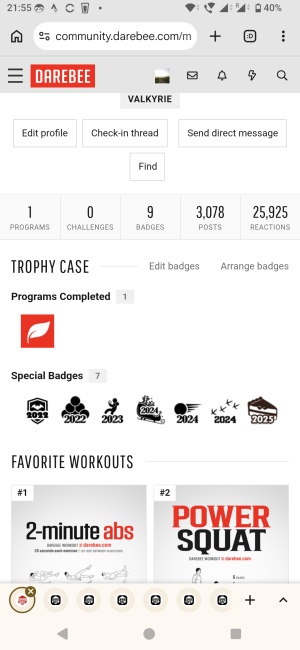
Programs and challenges you finished on the dashboard show up in Community Connect as badge tiles. Tap the ones you want and they're added to your community profile. Claiming only ever adds badges. It never removes anything you already have.
Currently Training
Tick up to 10 things you're working on and send them to the Currently Training section of your community profile. One heads-up: this replaces the list on your profile. If you set it up by hand on the forum, it will be swapped for what you send from the dashboard. You can still edit it in Edit Profile afterwards.
Backups
Your dashboard backup now remembers your community link and your Community Connect settings. Restore it on a new device and your account comes along with it.
Help us test, pretty please?
We've tested this in Chrome, Firefox and Safari but you have far more devices and habits than we do. If something looks off (a missing entry, a badge that didn't stick, a number that seems wrong) we'd be very grateful if you could let us know in this thread. A screenshot and your browser and device help a lot.
Thank you for testing with us. The dashboard and the forum are officially on speaking terms now and we'd like to keep it that way.
Remember when we linked the dashboard to the community so your quest reps could show up in your activity log? That was the warm-up. Community Connect now has its own button on your darebee.com dashboard (right next to Settings, Backup and Storage) and it does a lot more than before.
All of this is optional. If you don't have a community account or simply don't want any of it, nothing changes for you. You won't even see these features unless you link your account.
And a big thank you to everyone who tested the account link in Safari. It works! iPhone and iPad folks are good to go.
Linking your account
- Log in to the community in the same browser you use for your dashboard.
- Open your dashboard on darebee.com and tap Community Connect.
- Tap Link my community account. No typing and no passwords. The dashboard asks the forum who you are and that's it.
Quests and events
This one is on as soon as you link. Everything you log in a weekend quest or a community event shows up in Today's Activity and in your History. Something like "Contributed 100 punches to The Lighthouse at Saltreach". Several entries for the same quest on the same day are grouped into one line so your log stays tidy. Entries waiting for approval are marked as such.
Days you contributed also count toward your dashboard streak. In History you can filter by Quests or Events to see only those.
The Haunted Hive will be the first event to show up this way so we'd love to hear how it looks once it starts.
Weekend Quest card
Switch it on in Community Connect and the current weekend quest gets its own card on your dashboard. It shows the quest and what you've contributed so far. Perfect for anyone who keeps forgetting it's quest weekend (we see you).
Training alongside you
Switch on Show on my cards and your program and challenge cards show how many community members are doing the same one right now. It's nice to know you're not suffering alone.
Streak badge
Your community profile can show a streak badge from 5 days all the way up to 10 years. There are two ways to use it:
- Automatic: turn on Keep it up to date in Community Connect. Your dashboard sends your main Workout Streak to your profile once a day and the line under the switch tells you what was sent. If your streak breaks the badge goes down with it. While this is on it replaces any badge you picked yourself.
- Manual: leave the switch off and pick your badge in Edit Profile under Achievements. Honor system as always.
Claim your badges
Programs and challenges you finished on the dashboard show up in Community Connect as badge tiles. Tap the ones you want and they're added to your community profile. Claiming only ever adds badges. It never removes anything you already have.
Currently Training
Tick up to 10 things you're working on and send them to the Currently Training section of your community profile. One heads-up: this replaces the list on your profile. If you set it up by hand on the forum, it will be swapped for what you send from the dashboard. You can still edit it in Edit Profile afterwards.
Backups
Your dashboard backup now remembers your community link and your Community Connect settings. Restore it on a new device and your account comes along with it.
Help us test, pretty please?
We've tested this in Chrome, Firefox and Safari but you have far more devices and habits than we do. If something looks off (a missing entry, a badge that didn't stick, a number that seems wrong) we'd be very grateful if you could let us know in this thread. A screenshot and your browser and device help a lot.
Thank you for testing with us. The dashboard and the forum are officially on speaking terms now and we'd like to keep it that way.