New Custom Training Plans Added - You can now have your own

We have 50 training plans (right now). Not one of them is exactly yours. That changes today: you can now build your own plan on DAREBEE with the links right in it, so you tap a day and land on the workout instead of hunting for it. It took us one weekend, which is either impressive or suspicious.

What it is
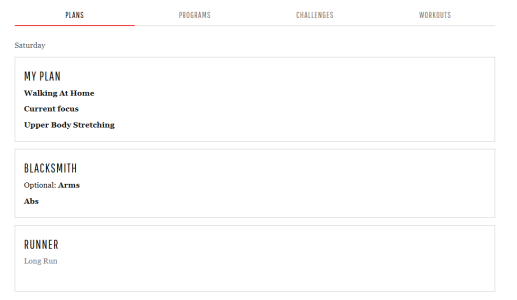
Three slots of your own in the Training Plans filter: My Plan 1, 2 and 3. They look like our plans (name, weekly table, MY PLAN tag) but they are yours. Saved on your device like your dashboard and bookmarks, nothing to sign up for.

How to use it
1. Open the Training Plans filter and pick "custom plans" under Plan Type, or scroll to the last page where the empty slots sit.
2. Tap a slot. It opens straight into the editor.
3. Give it a name (up to 20 characters, our plan names are taken).
4. For each day tap + add and choose:
  • Filter - type, focus, difficulty, equipment. Monday becomes "Easy Full Body Cardio, No Equipment" and the link opens the workout filter with those boxes ticked.
  • Link - paste any darebee.com address. A workout, a collection, a program, a challenge, a guide. The label fills in by itself and you can change it.
  • Text - rest, a walk, your own routine, anything.
Up to three per day. Everything saves as you go. Once a plan has something in it, it moves to the front of the filter so it's the first card you see.

Copy an existing plan? Not yet. Copy your own plan into another slot and tweak it? Yes, there's a button for that. "My week starts on" works on custom plans too.

Please test it
This is fresh out of the oven. Build a plan, use it for a few days and tell us what gets in the way. Things we'd love to hear about:
  • Links that don't go where you expected
  • Anything that looks off on your phone
  • Something you wanted to add and couldn't
Your plans live in your browser, so if you clear site data or use an iPhone and stay away a week, they go with everything else. Backup & Restore on the dashboard covers them.

Please let us know if you like the new feature, or if you found any bugs, below.

 
Exactly what I needed so that I can stop going into a random note to look up that day’s walking time. One thing though, can the name that we’ve given our plan be replicated on the dashboard? Currently, it says “My Plan 1 Training Plan”.
Fixed. Your dashboard now shows the name you gave the plan instead of "My Plan 1 Training Plan". A reload should do it! :thankyou:
 
Could you also make space for a small training blurb overview under the program and for each day of the week, like the Darebee training plans have?
And please also make it so you can pick more than 1 for the filter option's difficulty level?
(Can you tell I'm currently playing around with this custom thing and comparing to the standard plans and experimenting with how it looks and behaves haha :LOL:)
 
Could you please make it so we can add our own bookmark folders into the links somehow and they'd link to the specific folder? Or would that mean storage and stuff on the servers and there isn't enough to do it for everyone?
 
@Rrr All four are in, thank you for the testing session.

- Any day with more than one entry now has a "Pick one of these" switch. Walk or cardio, your call on the day.
- There's an "About this plan" box that shows under the table as an Overview, and every day can take its own note so the page reads like our plans do.
- Difficulty takes several picks at once. Light and easy together is one tap each.
- Your bookmark collections are now in the Link picker. Pick one and that day opens straight on that collection in your bookmarks.

On the storage question: none of it goes anywhere. The plan, your bookmarks and the links between them all stay on your device, the same as the dashboard. A reload should bring everything in. Keep poking at it and tell us what else gets in the way.

:thankyou:
 
@Rrr All four are in, thank you for the testing session.

- Any day with more than one entry now has a "Pick one of these" switch. Walk or cardio, your call on the day.
- There's an "About this plan" box that shows under the table as an Overview, and every day can take its own note so the page reads like our plans do.
- Difficulty takes several picks at once. Light and easy together is one tap each.
- Your bookmark collections are now in the Link picker. Pick one and that day opens straight on that collection in your bookmarks.

On the storage question: none of it goes anywhere. The plan, your bookmarks and the links between them all stay on your device, the same as the dashboard. A reload should bring everything in. Keep poking at it and tell us what else gets in the way.

:thankyou:
Okay so for the OR thing, it is probably hard to do, but can it be made so if there's 3 entries on a day it only applies to 2 of them?
Aka, with this function a day might look like this: combat & stretching OR yoga. Full body strength & cardio OR hiit.
Thanks for all your work!!
 
Okay so for the OR thing, it is probably hard to do, but can it be made so if there's 3 entries on a day it only applies to 2 of them?
Aka, with this function a day might look like this: combat & stretching OR yoga. Full body strength & cardio OR hiit.
Thanks for all your work!!
Done. The and/or is now between each pair of entries instead of one switch for the whole day, so "combat and stretching or yoga" is exactly that: tap the little "and" between two entries to flip it to "or" and back. Your existing days keep what they had.
 
I have a question please. I have filled my custom plan, and then I went to my profile and wanted to mark it as the thing I´m training now. But custom plans are not shown among options (Darebee training plans) there. Will this be possible in the future, please?
 
1. Could we possible get it as a json export? It's easy to overwrite a detailed plan by accident with a single click ... I'm clumsy ;)
I tried to look in the html but couldn't find it easily. The dashboard export only shows the default title, slug and selectedAt.

2. Could we get more than three options per day at some point? With three custom plans you have 9 options of course 🤷‍♀️

3. Personally I would prefer a tab on the dashboard for plans, similar to programs and challenges, that only shows you the current day. All max three plans and their to do's for that day. Now plans are placed at the top of the dashboard, it's fine of course but I don't immediately see the reason for keeping it separate from the rest of the UI.
I used my company Figma pro account to throw something together, I rarely use my credits anyway and then my manager is happy that I did "something" with AI, let's not mention it's not work related ;)

1793947924203.png
 
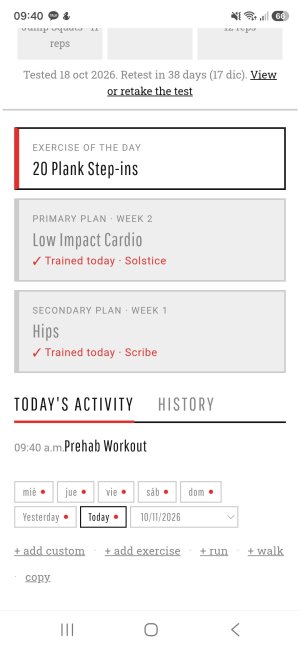
If I have multiple custom plan cards they are all set to done after doing one thing, I've only done the warmup. Not sure if that's on purpose?
Secondary plan "done" is fine but the primary plan should probably still be unchecked?
1794292993965.png
 
I have the same problem as @Nox with the daily cards of training plans. I just did the warm up but the cards are checked as "done"
 

Attachments

  • 29130.jpg
    29130.jpg
    147.3 KB · Views: 0
  • Like
Reactions: Nox