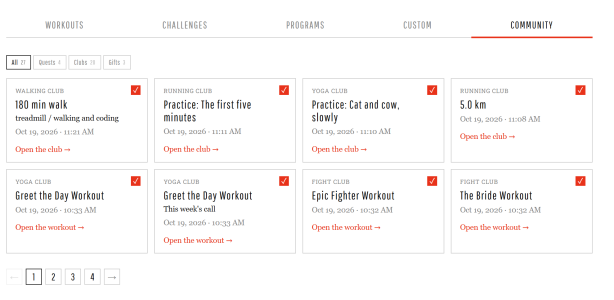
Community Clubs Update - the clubs grew up a bit while you were training

A few things changed in the clubs this week today.

Check-ins are real posts now
Every check-in and postcard is a proper forum post. It counts toward your message count, it takes reactions like any other post, and you get an alert when someone reacts to yours. Tap the count to see who it was. Check-ins can't be edited after posting. If something went wrong, remove it and check in again.

Up to three check-ins a day
Two sessions in one day happen. So do three. The club takes up to three check-ins a day now, which also covers the evening fix for the morning typo.

Undo for calls and practices
Done on the week's call and Practiced on the practice of the week both have an Undo under them. No more living with a misclick until Monday.

Clubs and the dashboard talk to each other
If your community account is linked on the darebee.com dashboard and you are in a club:
- Log a combat or yoga workout on darebee.com and it checks you in to Fight Club or Yoga Club by itself. If it happens to be the week's call, the call is done and the star is yours.
- The dashboard now has "+ run" and "+ walk" next to "+ add custom". A run or a walk logged there for today also checks in to Running Club or Walking Club.
- Everything you do in a club shows up on the dashboard: check-ins, calls, practices. Same workout on both sides the same day is one row, not two.
No link, no club? Nothing changes for you.

Milestones belong to the club
When a club's total passes a milestone, the Manager posts it in the forum with the names of everyone who checked in on the way there. The club page shows the badge you are working on above the bar, greyed until it falls, in color after. It is a club thing, not a personal badge: nobody gets there alone.

Runners: km or miles
Running Club has a km / miles switch in the Club total header and on the check-in field. Pick one and the whole page follows, including what you type. The club keeps counting in km underneath so the total stays one number.

Little numbers on the club tiles
On the forum home, each club you belong to shows how many check-ins other members made since you last opened it. Open the club and it starts again from zero. Joins and your own check-ins don't count. Quiet by design, no alerts.

Smaller things
- Every club page has a "What you get" box with the rules and the badges.
- Every call and practice of the week has its own picture.
- Old call threads, recaps and last month's chat close themselves when the new ones go up, so the current one is always the open one.

If something looks off, tell us below, please. We would rather hear about it from you than find it ourselves at midnight.

 
Thanks Thank You GIF
 
Clubs and the dashboard talk to each other
If your community account is linked on the darebee.com dashboard and you are in a club:
- Log a combat or yoga workout on darebee.com and it checks you in to Fight Club or Yoga Club by itself. If it happens to be the week's call, the call is done and the star is yours.
Hmm...

I did the Greet the Day workout. Doing so showed up on my Dashboard and also as a check-in for the Yoga Club and completion of this week's Yoga Club Call. The only issue is that it checked me into the Yoga Club as having completed 20 minutes of yoga. But Greet the Day is not that long of a workout. Since Club check-ins are not editable, I had to remove the entry and then re-post it manually to get the correct amount of practice time. And now I have two entries on my Dashboard for having completed the same workout.
 
Hmm...

I did the Greet the Day workout. Doing so showed up on my Dashboard and also as a check-in for the Yoga Club and completion of this week's Yoga Club Call. The only issue is that it checked me into the Yoga Club as having completed 20 minutes of yoga. But Greet the Day is not that long of a workout. Since Club check-ins are not editable, I had to remove the entry and then re-post it manually to get the correct amount of practice time. And now I have two entries on my Dashboard for having completed the same workout.
I was wondering what I did wrong :D I only spent a few minutes on it 😂 so it defaults to 20min?
 
I love the new clubs!

I think the idea of counting a yoga workout automatically as a session is generally good but still a bit flawed. Today I did: 5 minutes of vinyasa, Deep workout and Halo workout back to back. Halo and Deep counted as two sessions and if I had logged the vinyasa manually it would've been another session. Similar to Laura I removed the automatic entrys and re-logged everything manually as one check-in.
 
I've had to turn off my Community activity logging directly to my Dashboard since Club activity got added to this feature.

Often my squats and push-ups are going to be part of larger workouts. e.g.: Yesterday I did Crucible Day 1, which includes squats. The Crucible workout shows up on my Dashboard automatically. Which is great. But it's not a check-in for Squat Club. So I had to log my Crucible squats separately there. Which then caused them to show up on my Dashboard as if they were a separate thing from the workout already posted. Which they were not.

With Yoga Club I ran into the same problem. I did a workout from 30 Days of Yoga yesterday, which logs automatically to my Dashboard but does not log automatically to Yoga Club. So I logged it in the Club separately. Which then caused it to appear as two entries on my Dashboard.

Thinking more on this feature, I think the automatic Dashboard logging of Quest and Event participation will present issues too. I really felt for @Anek not being allowed to log her 650 Program jumping jacks towards last weekend's Quest! Traditionally, reps within DAREBEE Programs and Workouts have always counted toward Event participation. I think it is important that they continue to do so.

If someone is already doing a high volume of a particular exercise for their Program(s), what does it benefit them to encourage them to do even more of that exercise for a Quest/Event? For someone already training at a level which challenges them, excluding their regular Program work forces them to risk overtraining in order to participate in a Community event. I don't think this is a choice we want to be asking people to make. Also: DAREBEE Events have, in the past, been a great way to encourage people to check out DAREBEE Workouts they might not otherwise have explored. (e.g.: People often contribute to the Battleground Event by doing DAREBEE Combat Workouts.) What benefit is there to discouraging this practice?

I see issues with the automatic posting of completed Workouts and Dashboard entries to the Clubs too.
  1. It creates confusion due to inconsistencies between what logs in a Club and what does not (e.g.: yoga Workouts but not yoga Program days logging to Yoga Club).
  2. It can create problems due to the limit on Club check-ins per day, as @Lhin encountered. Most of DAREBEE's yoga workouts are quite short. A dedicated yoga practitioner could easily complete more than three of them in a single day. Yogis who use off-site practices could encounter the same problem too. It's not at all unusual for yogis to complete multiple distinct practice sessions within a single day.
  3. I'd also question what value the Clubs are meant to provide if Club members don't need to actually visit them to check-in. Visiting a Club page and interacting with other members there builds community, and community helps people to stick with their exercise programs. Without that community, they're just another game element for earning profile badges. (Gamification also helps people to stick with their exercise programs. I'm not discounting the value of this. But I do think we're significantly diminishing the potential value of the Clubs by adding a function which dissuades people from actually visiting them.)
 
- The dashboard now has "+ run" and "+ walk" next to "+ add custom". A run or a walk logged there for today also checks in to Running Club or Walking Club.
These three options are now confusing the dates of my Dashboard entries.

I have "My day starts at" time on my Dashboard set to 6AM, since I often finish workouts after midnight. This was working great. And it still works great for workouts that get logged to my Dashboard automatically. I completed Crucible Day 1 last night after midnight. It showed up on my Dashboard as part of my October 19 work. Great!

But when I tried to add my walking minutes for the day, also after midnight, they showed up on my Dashboard as part of Sunday's work. The date stamp for "+ run", "+ walk", and "+ add custom" is now defaulting to the previous day's date when I add an entry after midnight, but then it also respects my "My day starts at" time on top of this. So the system is adjusting for my late nights twice.

e.g.: I tried to add a custom entry via my Dashboard at 1:00 AM, October 20. Because I have my Dashboard set to 6:00 AM as the start of a new "day", this is what I saw:

AfterMNlog.png

Looks fine to me. I want work that I log at 1AM Tuesday to count as part of Monday's work. So I filled in the activity field and clicked "ADD".

But the entry then showed up in my Dashboard log as an entry for 1:00 AM, October 18.
 
I've got a suggestion thoughts on how the community activity logging could be handled.

@Laura Rainbow Dragon made some good points here, all of these I agree with:
  • Reps should not be duplicated on the dashboard
  • Reps in Darebee programs and workouts should count for events
  • You should visit a club page, interact with other members, build community
  • 3 per day might not be enough
Additionally
  • Are calls also check-ins (see here; this might be fixed already, haven't had the chance to test it)?
  • Some calls or practices have to be done over multiple days (e.g. walk 5 days in a week)
  • The community is humans talking to each other. Automated posting of anything under the account of a human is contrary to that. (And club check-ins are posts.)
The dashboard shows what I've done that day. The way I want that to look is tinted by the way I do my check-ins. See 2026-01-25 in my check-in thread for a good example.

Taking all of this together, I came up with the following:

Dashboard Activity should only consist of darebee.com Activity, not of Community Activity. However Community Activity can be associated with darebee.com Activity on the dashboard.
  • Dashboard Activity is what shows up on the dashboard under Today's Activity. It is also what gets copied with the Copy button for posting in the community.
  • darebee.com Activity is clicking done on a workout. It is ticking off a day in a program or challenge. For a workout it is simply a link to the workout, for a program or challenge it is the link plus the day plus potentially a number of sets. darebee.com Activity is also what you can do with the plus buttons on the dashboard (custom / exercise / run / walk).
  • Community Activity is what happens in the quests, events, or clubs on the community forum.
What do I mean by associated? Let's look at some examples.

(1) I do this week's fight club workout and tick it off on darebee.com. It shows up in my dashboard, like usual. On the club page I press done as well. On the dashboard the workout now has a little "#FightClub" at the end, linking to the fight club thread.
(2) On a different week I do the fight club workout and press done on the club page. The dashboard now shows the workout as unassociated. Not actually part of the activity, just a hint floating somewhere. It has a link to the workout on darebee.com, I click it and tick the workout off. Now the dashboard shows the workout as usual and the unassociated has vanished, turned into the "#FightClub" badge at the end of the workout.

This means you press Done twice for a single workout that is part of a club, once on darebee.com and once in the community. But since we want you to visit the club page, that is sort of the point. Like, you get a star on the club page if you press the button there, that should be encouragement.

It gets more interesting when we talk about exercises of a workout.

(3) I do day 1 of Cardio Blast and tick it off. The dashboard says "13:12 CHALLENGE Cardio Blast - Day 1". I realize that I need those jumping jacks for the geese. I enter 50 jumping jacks in the quest thread. The dashboard gets a new entry (an unassociated entry, not an activity!) saying "unassociated: 50 flaps #Quest #Millbrook". I grab that and drop it on the Cardio Blast activity. The unassociated entry vanishes and the activity now reads "13:12 CHALLENGE Cardio Blast - Day 1 - 50 flaps #Quest #Millbrook". I have associated the quest exercise with the activity.

What about walking or running or exercises not part of a workout?

(4) I walk 60 minutes and log it in the walking club. The dashboard shows "unassociated: 60 mins with the doggo #WalkingClub". I could now try to associate that with a program, like maybe I'm doing 60 Days of Walking or there is a place for me to click and that turns it into a walking entry, like you add with the "+walk" button on the dashboard. I get an activity like "13:12 WALK 60 mins with the doggo #WalkingClub".
(5) I do 100 extra flaps for the geese quest. Dashboard: "unassociated: 100 flaps #Quest #Millbrook". Click button, choose jumping jacks or step jacks (since a "flap" could be either of those) and get an activity "13:12 EXERCISE Jumping Jacks 100 reps #Quest #Millbrook" like I'd get with the "+exercise" button.

For both of these, the ability to click on the unassociated entry is for making it easier. You could also just add the walk / run / exercise using the existing plus-buttons before associating the quest entry with drag-and-drop.

What happens to the Practice of the Week? It stretches across the entire week, so I believe putting it on a single day is incorrect. Therefore I'd err on the side of not adding it to the dashboard at all. The same goes for calls that can't be done on a single day. There could be a part of the dashboard that isn't daily but weekly and that'd be the place for that data.

Events are handled like the clubs or quests; it might look like this on the dashboard once associated: "13:12 WORKOUT Eye of the Tiger - 7 sets - 840 points #Battleground #ForTheDark".

Since we're handling all of the community activities the same way, the maximum of 3 entries per day needs to go. Multiple people have done more than 3 entries in one day on the last quest and I've done more than 3 entries in one day for events in the past.

If it hasn't been clear from the examples, the sync now only happens one way: from the community to the dashboard. And using the synchronized information is optional. You can only tick things off on darebee.com or you can only check-in in the club threads. You can ignore the dashboard. You don't need to turn on the activity sync. If you do have it on, you can still ignore the unassociated entries on the dashboard. You don't need to do any more work that you have right now. But the people who care about how their dashboard activity looks can use these new tools to track things properly.