Community Clubs Update - the clubs grew up a bit while you were training
A few things changed in the clubs this week today.
Check-ins are real posts now
Every check-in and postcard is a proper forum post. It counts toward your message count, it takes reactions like any other post, and you get an alert when someone reacts to yours. Tap the count to see who it was. Check-ins can't be edited after posting. If something went wrong, remove it and check in again.
Up to three check-ins a day
Two sessions in one day happen. So do three. The club takes up to three check-ins a day now, which also covers the evening fix for the morning typo.
Undo for calls and practices
Done on the week's call and Practiced on the practice of the week both have an Undo under them. No more living with a misclick until Monday.
Clubs and the dashboard talk to each other
If your community account is linked on the darebee.com dashboard and you are in a club:
- Log a combat or yoga workout on darebee.com and it checks you in to Fight Club or Yoga Club by itself. If it happens to be the week's call, the call is done and the star is yours.
- The dashboard now has "+ run" and "+ walk" next to "+ add custom". A run or a walk logged there for today also checks in to Running Club or Walking Club.
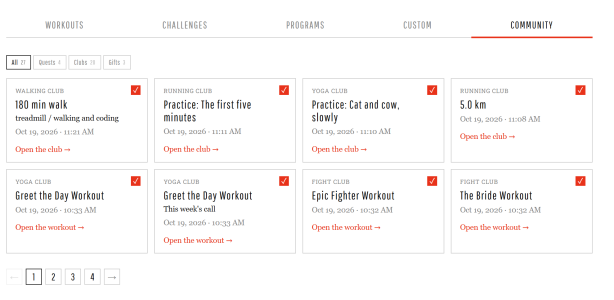
- Everything you do in a club shows up on the dashboard: check-ins, calls, practices. Same workout on both sides the same day is one row, not two.
No link, no club? Nothing changes for you.
Milestones belong to the club
When a club's total passes a milestone, the Manager posts it in the forum with the names of everyone who checked in on the way there. The club page shows the badge you are working on above the bar, greyed until it falls, in color after. It is a club thing, not a personal badge: nobody gets there alone.
Runners: km or miles
Running Club has a km / miles switch in the Club total header and on the check-in field. Pick one and the whole page follows, including what you type. The club keeps counting in km underneath so the total stays one number.
Little numbers on the club tiles
On the forum home, each club you belong to shows how many check-ins other members made since you last opened it. Open the club and it starts again from zero. Joins and your own check-ins don't count. Quiet by design, no alerts.
Smaller things
- Every club page has a "What you get" box with the rules and the badges.
- Every call and practice of the week has its own picture.
- Old call threads, recaps and last month's chat close themselves when the new ones go up, so the current one is always the open one.
If something looks off, tell us below, please. We would rather hear about it from you than find it ourselves at midnight.
Check-ins are real posts now
Every check-in and postcard is a proper forum post. It counts toward your message count, it takes reactions like any other post, and you get an alert when someone reacts to yours. Tap the count to see who it was. Check-ins can't be edited after posting. If something went wrong, remove it and check in again.
Up to three check-ins a day
Two sessions in one day happen. So do three. The club takes up to three check-ins a day now, which also covers the evening fix for the morning typo.
Undo for calls and practices
Done on the week's call and Practiced on the practice of the week both have an Undo under them. No more living with a misclick until Monday.
Clubs and the dashboard talk to each other
If your community account is linked on the darebee.com dashboard and you are in a club:
- Log a combat or yoga workout on darebee.com and it checks you in to Fight Club or Yoga Club by itself. If it happens to be the week's call, the call is done and the star is yours.
- The dashboard now has "+ run" and "+ walk" next to "+ add custom". A run or a walk logged there for today also checks in to Running Club or Walking Club.
- Everything you do in a club shows up on the dashboard: check-ins, calls, practices. Same workout on both sides the same day is one row, not two.
No link, no club? Nothing changes for you.
Milestones belong to the club
When a club's total passes a milestone, the Manager posts it in the forum with the names of everyone who checked in on the way there. The club page shows the badge you are working on above the bar, greyed until it falls, in color after. It is a club thing, not a personal badge: nobody gets there alone.
Runners: km or miles
Running Club has a km / miles switch in the Club total header and on the check-in field. Pick one and the whole page follows, including what you type. The club keeps counting in km underneath so the total stays one number.
Little numbers on the club tiles
On the forum home, each club you belong to shows how many check-ins other members made since you last opened it. Open the club and it starts again from zero. Joins and your own check-ins don't count. Quiet by design, no alerts.
Smaller things
- Every club page has a "What you get" box with the rules and the badges.
- Every call and practice of the week has its own picture.
- Old call threads, recaps and last month's chat close themselves when the new ones go up, so the current one is always the open one.
If something looks off, tell us below, please. We would rather hear about it from you than find it ourselves at midnight.








 I only spent a few minutes on it
  so it defaults to 20min?